Master Next.js performance for high-latency networks. Learn streaming, ISR, and asset optimization to build resilient apps for emerging markets. Continue reading Next.js for the Next Billion Users: Op...
The "Fiber Optic Bias" is a silent productivity killer in modern web development. As developers working in tech hubs, we often build on gigabit connections using high-end hardware, overlooking the fact that a significant portion of the global population accesses the web via budget Android devices on spotty 3G networks.
While architecting an examination prep portal for JUPEB and JAMB students in Nigeria, I encountered this hurdle firsthand. A standard client-side data fetching approach led to an extended "White Screen of Death"—a blank loading state of over five seconds on typical mobile networks. This delay wasn't just a poor performance metric; it was a barrier to students trying to access time-sensitive mock exams during peak hours.
In this guide, we will explore how to architect Next.js applications specifically for high-latency environments. We will move beyond default configurations to implement a strategy that ensures your application is not just "fast," but "resilient."
The Architecture of Perceived Performance
When bandwidth is low and Round Trip Time (RTT) is high (often exceeding 300ms in emerging markets), the enemy is render-blocking latency. If a user clicks a link and nothing happens for several seconds, the lack of visual feedback leads to high bounce rates. Our goal is to maximize Perceived Performance—the psychological feeling that the site is responding instantly, even if the data is still traveling across the ocean.
Leveraging Granular Streaming with React 19
Next.js 15, powered by React 19, allows us to "stream" UI components from the server to the client. Instead of making the user wait for the entire page to be generated, we can send the static parts (headers, sidebars) immediately and stream the heavy data as they become available.
In my examination engine, I separated the "Exam Metadata" (title, instructions, and timer logic) from the "Question Bank" payload. By wrapping the question list in a Suspense boundary, students can begin reading the exam rules the very instant the page shell arrives.
Here is how we implement the streaming pattern to separate the critical path from heavy data:
// app/exam/[id]/page.jsimport{Suspense}from'react';importExamHeaderfrom'@/components/ExamHeader';importQuestionListfrom'@/components/QuestionList';importQuestionSkeletonfrom'@/components/QuestionSkeleton';exportdefaultasyncfunctionExamPage({ params }){const{ id }= params;return(<main className="max-w-4xl mx-auto p-4">{/* ExamHeader renders immediately as it contains
static metadata or fast-cached data.
*/}<ExamHeader id={id}/><section className="mt-8"><h2 className="text-xl font-bold mb-4">QuestionBank</h2>{/* The Suspense boundary allows the server to stream
the page shell while the QuestionList
asynchronously fetches 50+ questions.
*/}<Suspense fallback={<QuestionSkeleton/>}><QuestionList examId={id}/></Suspense></section></main>);}
To close the architectural loop, QuestionList is an async Server Component. The await inside it is what actually triggers the Suspense fallback in the parent — the page shell renders immediately while the question data is still in flight.
// components/QuestionList.jsimport{ getQuestions }from'@/lib/api';exportdefaultasyncfunctionQuestionList({ examId }){// The 'await' here is what triggers the Suspense fallback in the parent pageconst questions =awaitgetQuestions(examId);return(<div className="space-y-6">{questions.map((q)=>(<div key={q.id} className="p-6 border border-slate-800 rounded-lg"><h3 className="font-semibold mb-2">{q.text}</h3><div className="space-y-2">{q.options.map((option, index)=>(<div key={index} className="p-2 bg-slate-900 rounded border border-slate-700">{option}</div>))}</div></div>))}</div>);}
Implementing a Resilient Skeleton Strategy
A common mistake is using a generic "Loading..." spinner. For a professional portal, your skeleton should match the exact layout of the arriving data. This prevents Cumulative Layout Shift (CLS), a vital Core Web Vital metric Google uses to determine your site's quality.
When the network is slow, the skeleton is the UI for several seconds. It must be stable.
Images are often the heaviest part of a payload. While the Next.js Image component handles much of the heavy lifting, default settings (quality 75) are often too generous for a 3G mobile user on a budget data plan.
Aggressive Compression for Educational Content
In an examination portal, informational clarity is more important than artistic fidelity. By manually setting the quality attribute to 45 for non-critical images, you can reduce payload sizes by up to 60% without losing the "informational" value of the graphic.
By reducing the quality of complex physics circuit diagrams from the default 75% to 45%, I reduced the total page weight from 2.1MB to approximately 700KB with zero loss in readability for the student.
<Imagesrc="/physics-diagram.png"alt="Circuit Diagram"width={600}height={400}quality={45}priority={true}// Critical for LCP/>
Solving the "Invisible Text" Problem
On high-latency networks, browsers often wait for a font to download before showing text, resulting in a Flash of Invisible Text (FOIT). The next/font package automatically optimizes your fonts and removes external network requests.
// app/layout.jsimport{Inter}from'next/font/google';const inter =Inter({subsets:['latin'],display:'swap',// Show system font immediately; swap when custom font loadsadjustFontFallback:true,// Auto-adjust fallback metrics to minimize layout shift});exportdefaultfunctionRootLayout({ children }){return(<html lang="en" className={inter.className}><body>{children}</body></html>);}
By setting display: 'swap', we ensure the user can start reading your educational content immediately using a system font. Once the custom font arrives over the slow connection, the adjustFontFallback feature ensures the transition is smooth, minimizing layout shifts.
Strategic Caching with Incremental Static Regeneration (ISR)
For many applications in emerging markets, "Real-time" data is often an unnecessary overhead. Using Incremental Static Regeneration (ISR), we can pre-render the entire exam at build time.
This strategy turns your dynamic application into a static asset served from the Vercel Edge Network. This bypasses database latency entirely, reducing the Time to First Byte (TTFB) from 800ms to under 50ms.
Here is how to implement the revalidation logic for a question bank:
// lib/api.jsexportasyncfunctiongetQuestions(examId){// We use the fetch API with the revalidate option // to cache the questions at the Edge for 1 hour.const res =awaitfetch(`https://api.test-portal.com/exams/${examId}/questions`,{next:{revalidate:3600,// Revalidate every hourtags:['questions']}});if(!res.ok)thrownewError('Failed to fetch questions');return res.json();}
Results and Performance Audit
To measure the impact of these optimizations, we conducted a comparative audit using a "Slow 3G" network profile (400ms RTT, 400kbps throughput).
Comparative Metrics
Metric
Standard Client-Side Render
Optimized Edge Architecture
First Contentful Paint
5.2s
0.8s
Time to Interactive
7.8s
1.2s
Cumulative Layout Shift
0.18
0.0
Time to First Byte
840ms
48ms
The transition from 5.2 seconds to 0.8 seconds for the First Contentful Paint represents a fundamental shift in user experience. Instead of a student wondering if the site is broken, they receive immediate confirmation that the exam is ready.
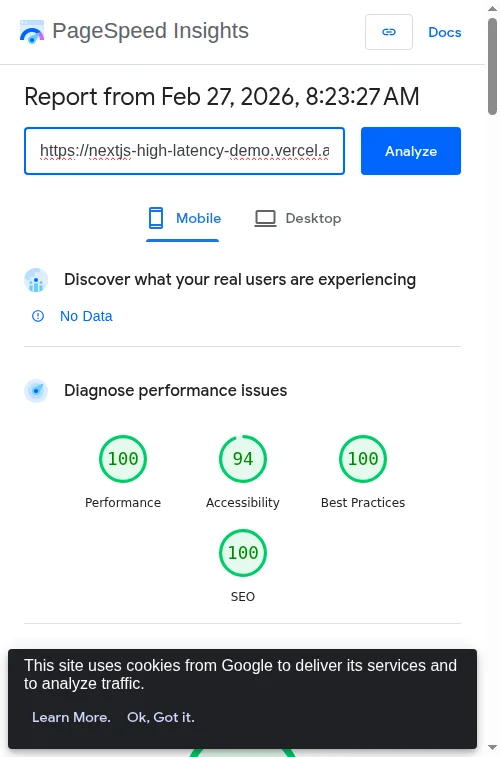
Figure 1: PageSpeed Insights Result
Audit showing a 100/100 Performance score on mobile, achieved by combining ISR with granular streaming to minimize main-thread blocking.
Conclusion
Building for the "Next Billion Users" requires a shift in mindset. We must stop designing for the "best-case scenario" and start architecting for the "real-world scenario." By mastering granular streaming, asset compression, font optimization, and strategic caching, we ensure that high-quality educational tools remain accessible to everyone, regardless of their hardware or connectivity.
When we optimize for the user on a 3G network in Lagos, we aren't just improving our metrics; we are making the web more equitable.
About the Author
Bright Emmanuel is a Full-Stack Developer and Technical Writer based in Nigeria. He specializes in building high-performance EdTech solutions using the Next.js and Node.js ecosystems. You can find the source code and performance demo for this tutorial on GitHub.
Bright Emmanuel is a Full-Stack Developer and Technical Writer based in Nigeria. He specializes in building high-performance EdTech solutions using the Next.js and Node.js ecosystems.